Okay, folks. So. Tumblr’s jumped the shark in a big way, and I’m not even just talking about indiscriminately blocking all “adult” content on a platform that IS, in fact, primarily 18+.
Many blogs, like the wonderful @blackkatmagic , that are not especially NSFW have vanished.
(And I for one LIKE being able to go to curated porn blogs run by actual people and have a chance of finding stuff to my taste, it was one of the things that kept me on this hellsite, but that’s another issue entirely.)
I know lots of people are talking about migrating, but none of us are sure to where yet. Pillowfort seems to be an option, some people are talking about Twitter. But for now, it’s a mess, and even if we knew where we were going, it’s often a huge process, and a lot of us have stuff on tumblr that ONLY exists there.
One possible quick solution to save your blogs, both NSFW and personal, is to import it to WordPress. I found this solution through from frantic googling on how to save an entire blog, text posts an all. There are several apps for downloading all the pictures from a tumblr, (Plently for Windows, but only a few paid ones for mac, of which Tumbelog Picture Downloader is working for me so far) but this is the only solution I’ve seen so far that allows you to save EVERYTHING. I downloaded my NSFW blog in like 10 min. My regular blog, which is significantly larger, is in the process of importing, but I don’t anticipate any problems. I will, of course, update you if I have any.
This tutorial I found worked really easily. http://quickguide (.) tumblr (.) com/post/39780378703/backing-up-your-tumblr-blog-to-wordpress
I put parenthesis around the .’s like we’re back in FF-Hell, just in case tumblr’s new thing about outgoing links kicks in. You know what to do.
To break it down, just in case:
Sign up for a WordPress.com account at wordpress (.) com/start
You’ll have to create an account, with your email, a username, and a password. They should send you a confirmation email immediately, check it, activate it, and you’re good to go.
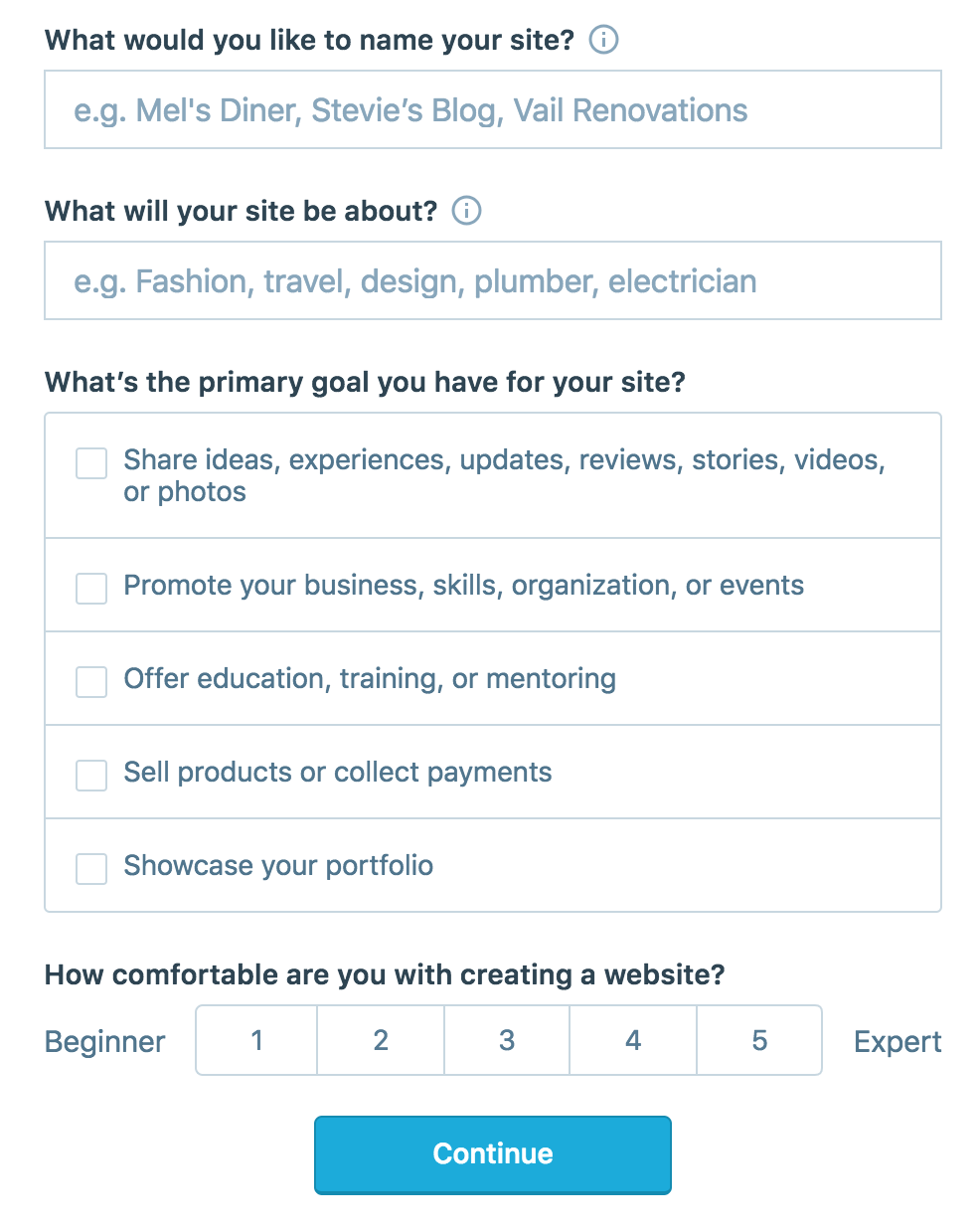
On the site, it will ask you for a site name. That page asks you a bunch of other information too, but you only have to fill out the site name.
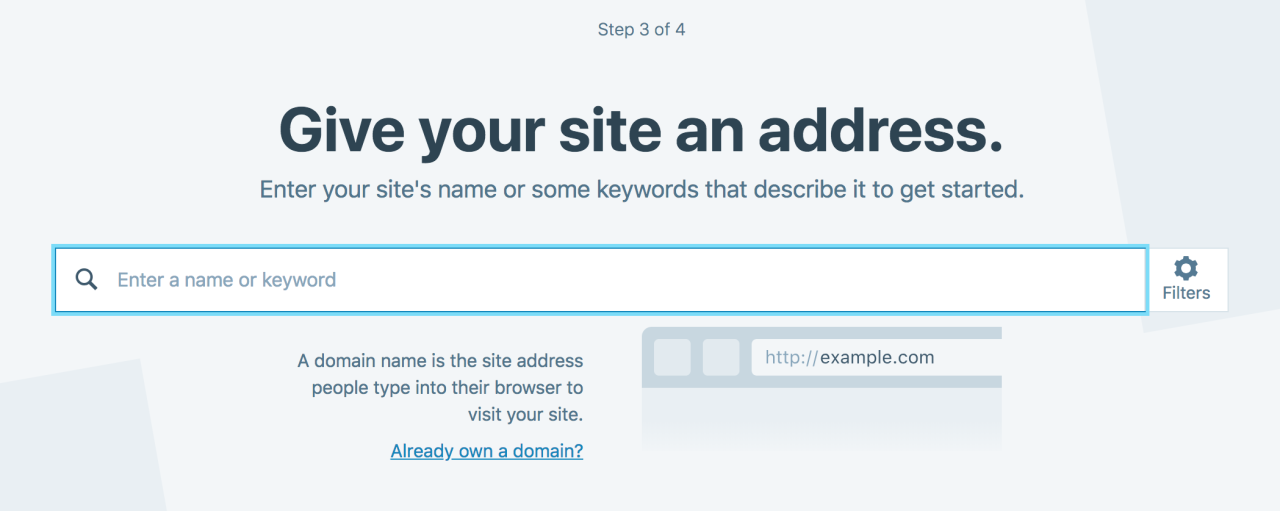
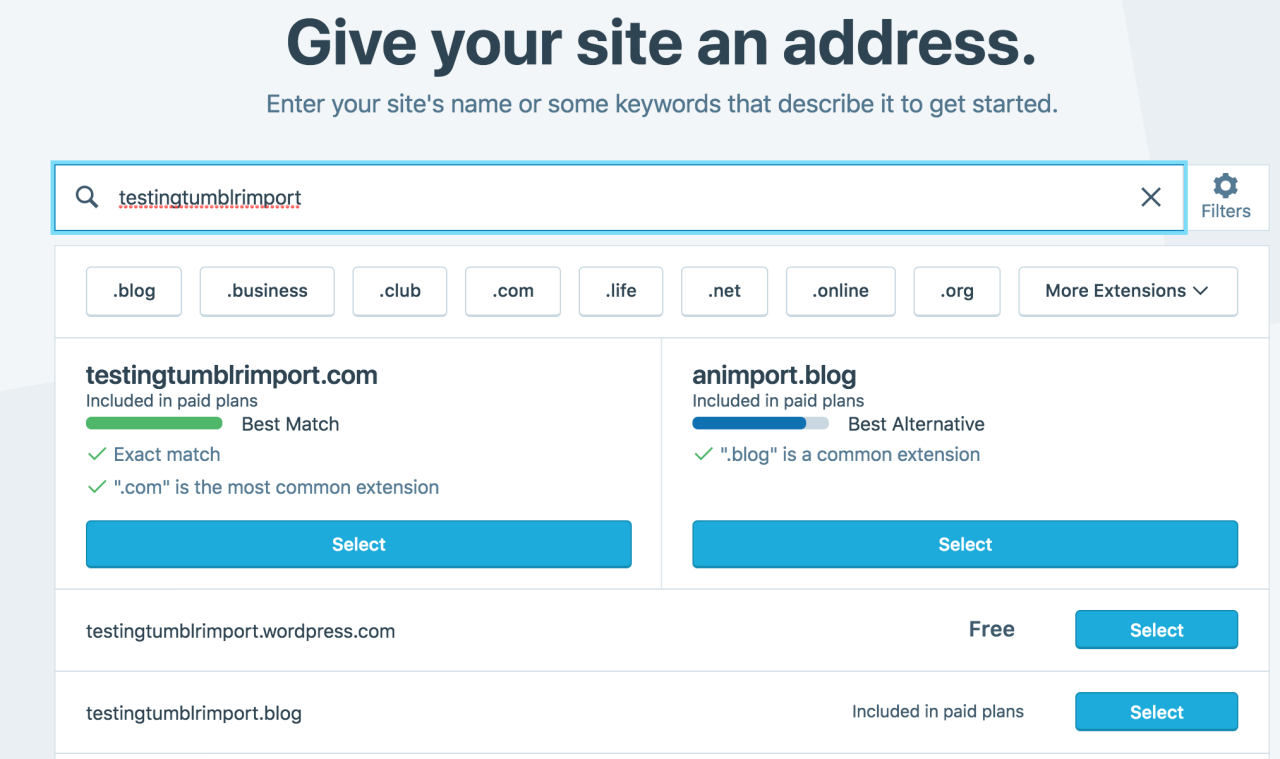
Then you have to give your site a URL. If you’re lucky, your tumblr URL is still available, if not you’ll have to come up with another one, sorry.
It will tell you if that option is still available for free.
Then it will ask you to pick a plan. Free is really good enough, I swear.
Now you’re set up! You can import your tumblr!
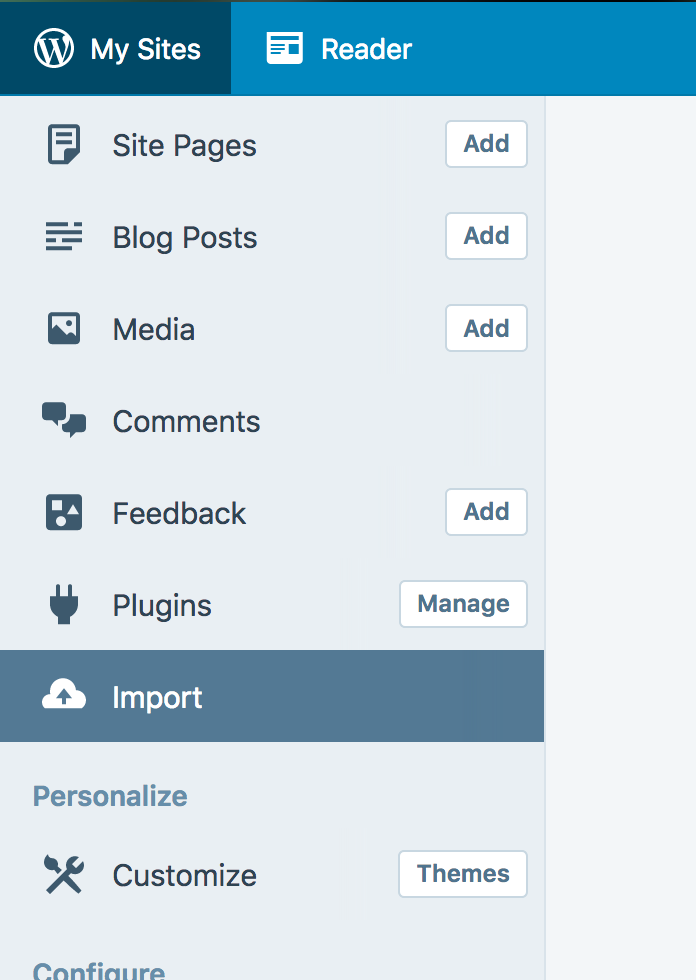
The only differences from the linked tutorial are that the Import button is now on the first level menu, not in tools.
Hit Import, then you have to follow the link for “other importers” at the bottom, to find the option for Tumblr.
Then you’ll have to sign in with tumblr, using your normal tumblr credentials. You’ll be redirected there automatically.
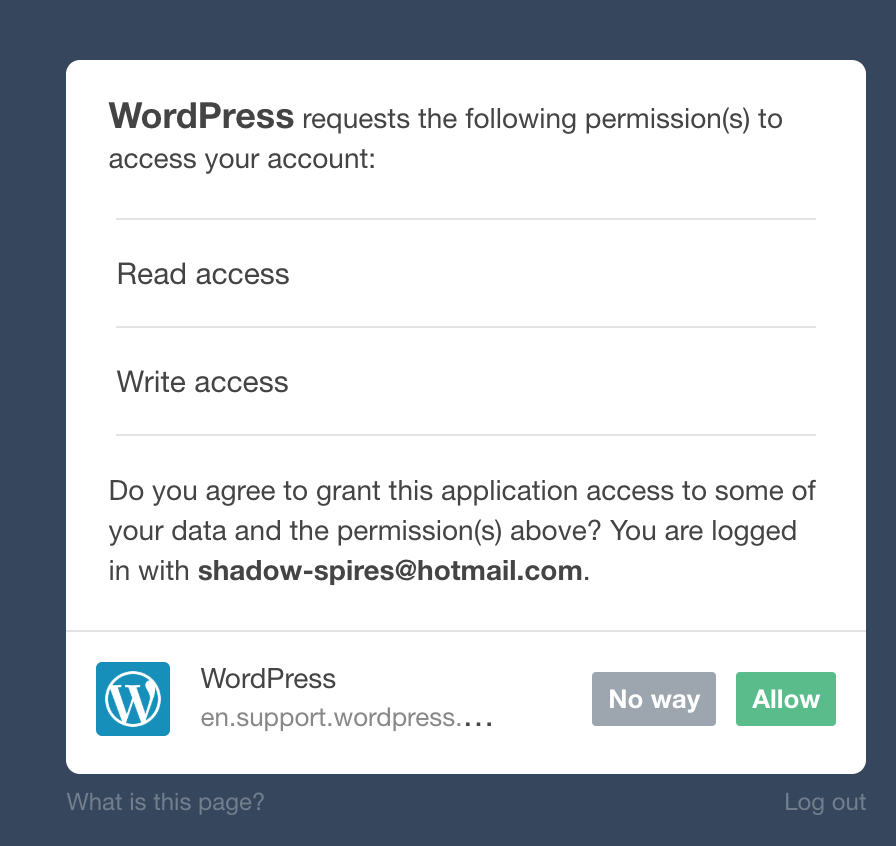
You’ll have to allow WordPress permissions on your blog.
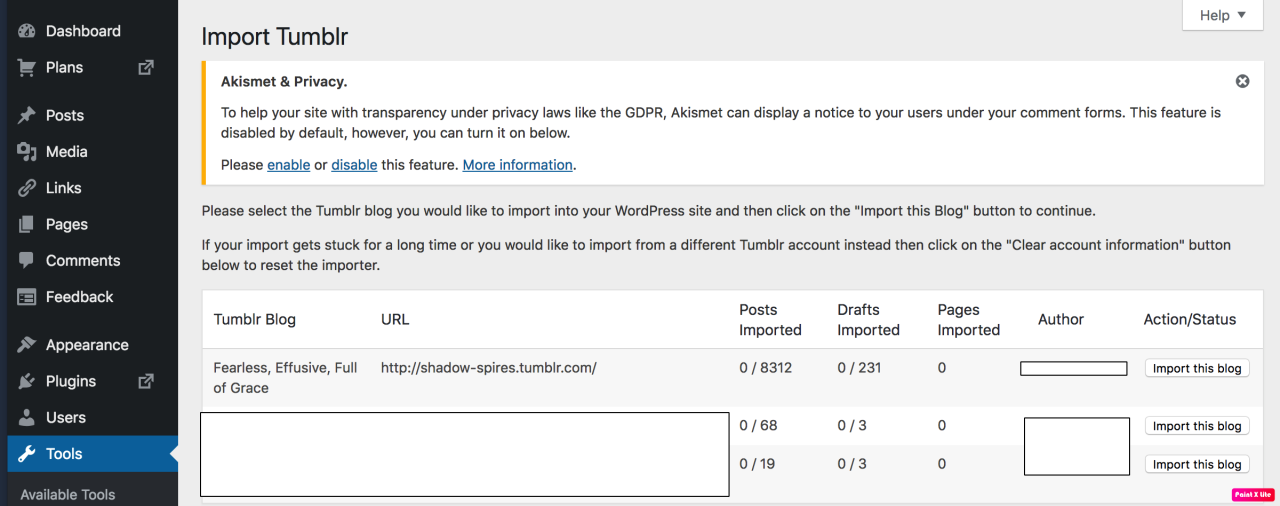
Then your blogs, including all your sideblogs, will show up in wordpress.
Hit import, wait a WHILE depending on the size of your blog, and you’re done!
ALSO!!
I made my NSFW blog private for now, since I don’t know WP’s policy on NSFW.
This means that to access it, someone has to have an account and request access. But hey, part of our problem on this hellsite has been people going places they aren’t wanted, so I don’t personally see this as a bad thing. They can send a request from the landing site on your blog, you get an email, click a link in the email, and PRESTO, they have access.
To make it private, go to Settings > Reading > Site Visibility. Go back and check, it took me changing the setting twice for it to actually stick.
tl;dr, you can import your entire blog to wordpress in just a few steps.
I’m going to tag the hell out of this, in no particular order. PLEASE reblog this and spread the word so people know it’s an option. If you’re having trouble, PM me, and I’m happy to help.
We at Piczel.tv are sad to see Tumblr’s stance against NSFW artists, and would like to offer up our services as an alternative to Tumblr’s arbitrary shadowbans, deletions, and general stupidity.
We’re happy to host adult artists who are looking for a new place to call home, and are planning a few key upgrades and features.
Effectively immediately though, our gallery upload size restriction has been removed, to be likely raised to 10MB in the near future for non-premium users.
As always, we support image sets, and don’t compress anything.
Firstly, for those that have been using tumblr as a portfolio, you’ll need a way to download all of your art, if you don’t have backups somewhere else. We are planning a tool for Piczel.tv that will import zip files full of images, including titles and descriptions if we are able.
Second, we’re planning the following upgrades to piczel in the coming weeks:
1. Bulk upload/import to your piczel.tv gallery 2. Gallery UI cleanup and improvements 3. Gallery performance improvements 4. Gallery comments with in line image and custom emote support 5. Site-wide PMs (in the vein of tumblr asks, but better) 6. Archive button for your piczel account
Don’t forget to follow us on twitter, we may be deleted on the 17th with everyone else. Until then, we’ll make posts here to keep everyone in the loop
Please consider reblogging this to help artists in need.
this post will be updated as I find more websites to add! please check with the original before reblogging to see if there’s an updated version, and message me with more suggestions if you have them!!
for general use
myspace.com – yes, it still exists, i’m just as surprised as you
soup.io – very similar to tumblr, plus it can import your tumblr blog
twitter.com – allows posting both text and photos in sets, allows retweets
livejournal.com – still an option, but questionably safe for fandom
wordpress.com – old and well-established, often considered the default
geared towards artists and photographers
deviantart.com – huge community, allows posting art + sorting into folders
furaffinity.net – similar to DA but for furries, easy to display commish info
instagram.com – photo and video posts, excellent tag search
piczel.tv – allows both streaming and posting art / photosets to a gallery
pixiv.net – huge anime art community, allows livestreaming
paid platforms
patreon.com – subscription-based access to many diff types of content
pillowfort.io – still in beta, but should function almost identically to tumblr
typepad.com – similar to wordpress but with reblogging and a dash
ways to save your current tumblr posts
use the wayback machine! you do have to archive each page of your blog individually but once you do all the content, including media, will be saved exactly as it was at the moment you archived it.
wordpress and soup both allow you to directly import whole tumblr blogs, and if i recall correctly it’s something both dreamwidth and pillowfort have said they are working on.
if you have some knowledge of computers you can try this github solution which uses a python script to download your whole blog to your computer.
even if you don’t know anything about programming or the command line
they give a very good beginners tutorial on how to use it so you should still give it a shot!
I was just semi-complaining that I was still looking for a decent way to backup my +6k posts without having to use paid services or even just wordpress (which has an import from tumblr tool that asks for permission to access your blog and also make posts), when I decided to actually put some effort into my google search.
Results were positive: I have successfully backed up my blog*
*By which I mean: everything that I have ever posted. Not included: drafts, queue, likes, followers, following, comments, notes, chat.
I followed this method (word by word), and now have a 450 MB folder on my computer with the name of my blog on it containing:
1. Folder “Archive” (contains .html files listed by month) 2. Folder “Media” (contains gifs and images, mine has +1k files in it; might contain also audios but I have no way of confirming that because I’ve never reblogged an audio post from this blog) 3. Folder “Posts” (contains single .html files, each one a post; I have +4k files in it) 4. Folder “Theme” (contains only my avatar, but it might be a matter of if you have personalized themes or not) 5. .html file “Index” (by opening it it will give you the archive of your blog organized by month; clicking on a month will open up the archive for that month, and you’ll be able to read all the posts for that month as if you were on your blog**, except sans your theme graphic, with each page containing 50 posts)
**I can see gifs, links, embedded videos, tags, number of notes (but I can’t open up the notes, clearly), text is also correctly formatted.
So yeah, in case anyone wants a very quick way to back up their blog, it took me less than 10 minutes.
P.S. I didn’t have any issue, but to be on the safe side always check for spyware and virus threats before and after downloading anything.
this is actually really useful if you have an art blog full of years of work that you otherwise no longer have access to the original files. A lot of the art I have in the early days of my art blog are in that boat. I did this process JUST for that reason and I was pretty astonished at just how many pieces of media it backs up! (literally all of it) Drawings I didn’t even realize were sitting in my archive due to having been posted to text posts or undercuts, or untagged for years! It’s worth it if just for that, even if tumblr isn’t shutting down or deleting your blog.
reference.
This is just for windows users, but just in case some of my followers can use it!
PSA
Back up admin Heather here, please do not make contact with Ky (main admin/owner) on Tumblr or any other media until tomorrow (December 4, 2018 after 7 AM mountain time) This bitch had weed for the first time tonight and is faded out of her mind. Her phone is being confiscated so her dumbass doesn’t do some stupid shit.





 Eclipse's Transformers Headcannons
You must be logged in to post a comment.